

When I started working on Open Stack, I had to investigate about the HA of the nova component. Unfortunatly the nova configuration needed a single entry point to connect to the MySQL database. The solution that came to me was to use HAProxy on top of my existing Galera cluster.
I. Introduction
Reminder: I will use the configuration of my previous article: MySQL multi-master réplication with Galera, the architecture works perfectly and the communications are established using SSL. But there were some issues:
- There was no load-balancing, the application only use one node and Galera replicates the data accross the cluster
- If the node where the application commit goes down, no more replication
The main goal was:
Setup a new feature which will provide load-balancing functionnality and access to my database through a single entry point by using a virtual IP address.
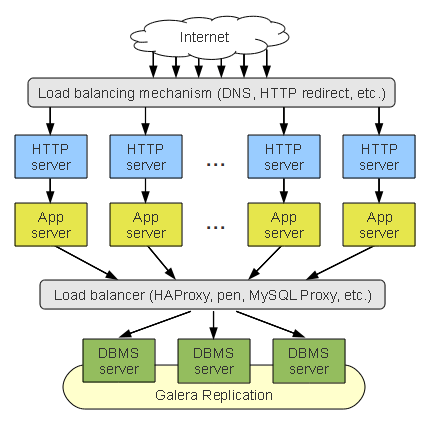
You can use some load-balancers for this purpose:
- Pen: a tiny TCP load-balancer
- GLB: Galera load-balancer, mainly based on Pen and fix missing functionnality to Pen
- MySQL Proxy: the one provides by MySQL
- HAProxy: THE load-balancer
Here a use case:
II. Setup
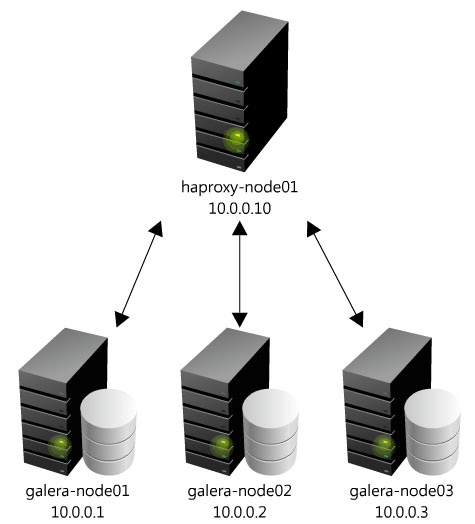
I will re-use my last Galera configuration, here the architecture I set up:
II.1. Network interfaces
NIC configuration, /etc/network/interfaces:
# This file describes the network interfaces available on your system
# and how to activate them. For more information, see interfaces(5).

# The loopback network interface
auto lo
iface lo inet loopback

# The primary network interface
auto eth0
iface eth0 inet dhcp

# The secondary network interface
auto eth1
iface eth1 inet static
address 10.0.0.10
netmask 255.0.0.0
Local name resolution, /etc/hosts:
127.0.0.1	localhost
127.0.1.1	haproxy-node01
10.0.0.2	galera-node02
10.0.0.1	galera-node01
10.0.0.3	galera-node03
10.0.0.10	haproxy-node01
10.0.0.11	haproxy-node02
II.2. HAProxy
Install it:
ubuntu@haproxy-node01:~$ sudo apt-get install haproxy -y
We allow the INIT script to launch HAProxy:
ubuntu@haproxy-node01:~$ sudo sed -i s/0/1/ /etc/default/haproxy
HAProxy configuration from scratch:
# this config needs haproxy-1.1.28 or haproxy-1.2.1

global
        log 127.0.0.1   local0
        log 127.0.0.1   local1 notice
        #log loghost    local0 info
        maxconn 1024
        #chroot /usr/share/haproxy
        user haproxy
        group haproxy
        daemon
        #debug
        #quiet

defaults
        log     global
        mode    http
        option  tcplog
        option  dontlognull
        retries 3
        option redispatch
        maxconn 1024
        timeout connect 5000ms
        timeout client 50000ms
        timeout server 50000ms

listen galera_cluster
        bind 10.0.0.100:3306
        mode tcp
        option  httpchk
        balance leastconn
        server galera-node01 10.0.0.1:3306 check port 9200
        server galera-node02 10.0.0.2:3306 check port 9200
        server galera-node03 10.0.0.3:3306 check port 9200
Main options details:
mode tcp: default mode, HAProxy will work at TCP level, a full-duplex connection will be established between the client and the server. Two others options are available:httpandhealthbalance roundrobin: defines the load-balancing algorythm to use. Round-robin is a loop system, if you have 2 servers, the failover will be something like this: 1,2,1,2option tcpka: enable thekeepalivealso know aspipelining
We run HAProxy:
ubuntu@haproxy-node01:~$ sudo service haproxy start
Does HAProxy work?
ubuntu@haproxy-node01:~$ sudo netstat -plantu | grep 3306
tcp        0      0 0.0.0.0:3306            0.0.0.0:*               LISTEN      3729/haproxy
Round-robin effects:
ubuntu@haproxy-node01:~$ mysql -uroot -proot -h127.0.0.1 -e "show variables like 'wsrep_node_name' ;"
+-----------------+---------------+
| Variable_name   | VALUE         |
+-----------------+---------------+
| wsrep_node_name | galera-node01 |
+-----------------+---------------+
ubuntu@haproxy-node01:~$ mysql -uroot -proot -h127.0.0.1 -e "show variables like 'wsrep_node_name' ;"
+-----------------+---------------+
| Variable_name   | VALUE         |
+-----------------+---------------+
| wsrep_node_name | galera-node02 |
+-----------------+---------------+
ubuntu@haproxy-node01:~$ mysql -uroot -proot -h127.0.0.1 -e "show variables like 'wsrep_node_name' ;"
+-----------------+---------------+
| Variable_name   | VALUE         |
+-----------------+---------------+
| wsrep_node_name | galera-node03 |
+-----------------+---------------+
II.3. Galera cluster check
Install a local service on the Galera nodes:
$ sudo apt-get install xinetd -y
$ wget -O /usr/bin/clustercheck https://raw.githubusercontent.com/olafz/percona-clustercheck/master/clustercheck
$ sudo chmod 755 /usr/bin/clustercheck

$ sudo cat > /etc/xinetd.d/mysqlchk <<EOF
# default: on
# description: mysqlchk
service mysqlchk
{
        disable = no
        flags = REUSE
        socket_type = stream
        port = 9200
        wait = no
        user = nobody
        server = /usr/bin/clustercheck
        log_on_failure += USERID
        only_from = 0.0.0.0/0
        bind = <galera_public_interface>
        per_source = UNLIMITED
}
EOF

$ sudo echo "mysqlchk   9200/tcp" | tee -a /etc/services

$ sudo service xinetd restart
III. Bonus scripts
III.1. HAProxy Hot Reconfiguration
Extract from the HAProxy configuration guide.
#!/bin/bash
#A hot reconfiguration script would look like this :
#Extract from http://haproxy.1wt.eu/download/1.3/doc/architecture.txt

# save previous state
mv /etc/haproxy/config /etc/haproxy/config.old
mv /var/run/haproxy.pid /var/run/haproxy.pid.old

mv /etc/haproxy/config.new /etc/haproxy/config
kill -TTOU $(cat /var/run/haproxy.pid.old)
if haproxy -p /var/run/haproxy.pid -f /etc/haproxy/config; then
    echo "New instance successfully loaded, stopping previous one."
    kill -USR1 $(cat /var/run/haproxy.pid.old)
    rm -f /var/run/haproxy.pid.old
    exit 1
else
    echo "New instance failed to start, resuming previous one."
    kill -TTIN $(cat /var/run/haproxy.pid.old)
    rm -f /var/run/haproxy.pid
    mv /var/run/haproxy.pid.old /var/run/haproxy.pid
    mv /etc/haproxy/config /etc/haproxy/config.new
    mv /etc/haproxy/config.old /etc/haproxy/config
    exit 0
fi
This setup is interesting but not ready for production. Indeed, putting an HAProxy node on top created a huge SPOF. In the next article, I will setup a failover active/passive cluster with Pacemaker.
III.2 Init script GLB
First download it from here and install it :)
Init script for the Galera Load Balancer daemon.
#!/bin/sh
#
# glbd          Start/Stop the Galera Load Balancer daemon.
#
# processname: glbd
# chkconfig: 2345 90 60
# description: GLB is a TCP load balancer similar to Pen. \
#              It lacks most of advanced Pen features, as \
#              the aim was to make a user-space TCP proxy which is \
#              as fast as possible. It can utilize multiple CPU cores. \
#              A list of destinations can be configured at runtime. \
#              Destination "draining" is supported. It features \
#              weight-based connection balancing (which becomes \
#              round-robin if weights are equal).

### BEGIN INIT INFO
# Provides: glbd
# Required-Start: $local_fs
# Required-Stop: $local_fs
# Default-Start:  2345
# Default-Stop: 90
# Short-Description: run glbd daemon
# Description: GLB is a TCP load balancer similar to Pen.
### END INIT INFO

prog="glbd"
proc=glbd
exec=/usr/sbin/glbd

LISTEN_PORT="8010"
CONTROL_PORT="8011"
THREADS="2"
DEFAULT_TARGETS="djdb2:8000:0.75 djdb3:8000:0.75 divjobs3:8000:0.75 divjobs4:8000:1"

stop() {
	echo -n "[`date`] $prog: stopping... "
	killall $exec &> /dev/null
	if [ $? -ne 0 ]; then
		echo "failed."
		return
	fi
	echo "done."
}

start() {
	if pidof $prog &> /dev/null ; then
		echo "[`date`] $prog: already running...";
		exit -1
	fi
	echo "[`date`] $prog: starting..."
	wait_for_connections_to_drop
	$exec --daemon --control 127.0.0.1:$CONTROL_PORT --threads $THREADS $LISTEN_PORT $DEFAULT_TARGETS
	PID=$!
	if [ $? -ne 0 ]; then
		echo "[`date`] $prog: failed to start."
		exit -1
	fi
	echo "[`date`] $prog: started, pid=$PID"
	exit 0
}

restart() {
	echo "[`date`] $prog: restarting..."
	stop
	start
}

wait_for_connections_to_drop() {
	while (netstat -na | grep -m 1 ":$LISTEN_PORT" &> /dev/null); do
		echo "[`date`] $prog: waiting for lingering sockets to clear up..."
		sleep 1s
	done;
}

getinfo() {
	echo getinfo | nc 127.0.0.1 $CONTROL_PORT && exit 0
	echo "[`date`] $prog: failed to query 'getinfo' from 127.0.0.1:$CONTROL_PORT"
	exit -1
}

getstats() {
	echo getstats | nc 127.0.0.1 $CONTROL_PORT && exit 0
	echo "[`date`] $prog: failed to query 'getstats' from 127.0.0.1:$CONTROL_PORT"
	exit -1
}

add() {
	if [ "$1" == "" ]; then
		echo $"Usage: $0 add <ip>:<port>[:<weight>]"
		exit -1
	fi
	if [ "`echo "$1" | nc 127.0.0.1 $CONTROL_PORT`" == "Ok" ]; then
		echo "[`date`] $prog: added '$1' successfully"
		#getinfo
		exit 0
	fi
	echo "[`date`] $prog: failed to add target '$1'."
	exit -1
}

remove() {
	if [ "$1" == "" ]; then
		echo $"Usage: $0 remove <ip>:<port>"
		exit -1
	fi
	if [ "`echo "$1:-1" | nc 127.0.0.1 $CONTROL_PORT`" == "Ok" ]; then
		echo "[`date`] $prog: removed '$1' successfully"
		#getinfo
		exit 0
	fi
	echo "[`date`] $prog: failed to remove target '$1'."
	exit -1
}

case $1 in
	start)
		start
	;;
	stop)
		stop
	;;
	restart)
		restart
	;;
	getinfo)
		getinfo
	;;
	getstats)
		getstats
	;;
	status)
		getinfo
	;;
	add)
		add $2
	;;
	remove)
		remove $2
	;;
	*)
		echo $"Usage: $0 {start|stop|restart|status|getstats|getinfo|add|remove}"
	exit 2
esac
Many thanks to Daniel Bonekeeper for the share :)