

It can be really handy to auto assign floating IP addresses to every new instance.
First create a dedicated pool:
$ sudo nova-manage floating create --pool pool_auto_assign --ip_range 172.17.1.32/27
Then modify your nova.conf with those flags:
default_floating_pool = pool_auto_assign
floating_range = 172.17.1.32/27
auto_assign_floating_ip = True
You may also want to increase the floating IPs quota:
quota_floating_ips = 50
Then restart nova-network:
$ sudo service nova-network restart
Finally run a new instance :)
You will only see this in the Instances & Volumes page:
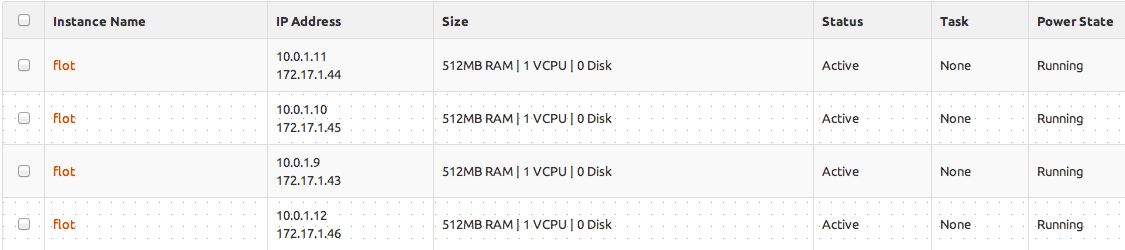
W Nothing in the Access & Security, this page will remain empty.
But you can use the nova-manage command to check which IP is assigned to which tenant:
$ sudo nova-manage floating list | egrep -v ^None
5172f50226f647ebb03ca4e4e82d056d    172.17.1.41 b69d71f6-a000-427f-895b-c59492428385    pool_auto_assign eth0
5172f50226f647ebb03ca4e4e82d056d    172.17.1.42 e1187b40-db91-427f-8f9d-7f99d6083229    pool_auto_assign eth0
5172f50226f647ebb03ca4e4e82d056d    172.17.1.43 d75fab10-b4ff-4ae7-8058-db94c96da73f    pool_auto_assign eth0
5172f50226f647ebb03ca4e4e82d056d    172.17.1.44 a749abf1-98e0-495d-84b2-604964644fc2    pool_auto_assign eth0
5172f50226f647ebb03ca4e4e82d056d    172.17.1.45 d08b6c19-8250-44f8-ae68-fa03f85f9c43    pool_auto_assign eth0
5172f50226f647ebb03ca4e4e82d056d    172.17.1.46 303537f4-33d0-42c2-8f3e-aafa53c635b0    pool_auto_assign eth0
In my opinion, this behavior is only wanted when you run OpenStack for your own purpose, for your private Cloud. True Cloud IaaS providers don’t really need to enable this feature.